Open the live demo
A running service desk with a worked scenario already in it - queue, SLA pressure, approvals, an outside participant, and role boundaries you can see from both sides. No install, no form, resets nightly.
Try it now
BareBones Ticketing
For teams whose requests live in a shared inbox and a spreadsheet - and who have to prove, later, who approved what. BareBones Ticketing turns that into governed intake, owned tickets, controlled workflows, and an audit trail you did not have to assemble, self-hosted on infrastructure you control.
Each release carries an executed validation package, designated by the validation team; Professional and Lifetime include it as an account download.
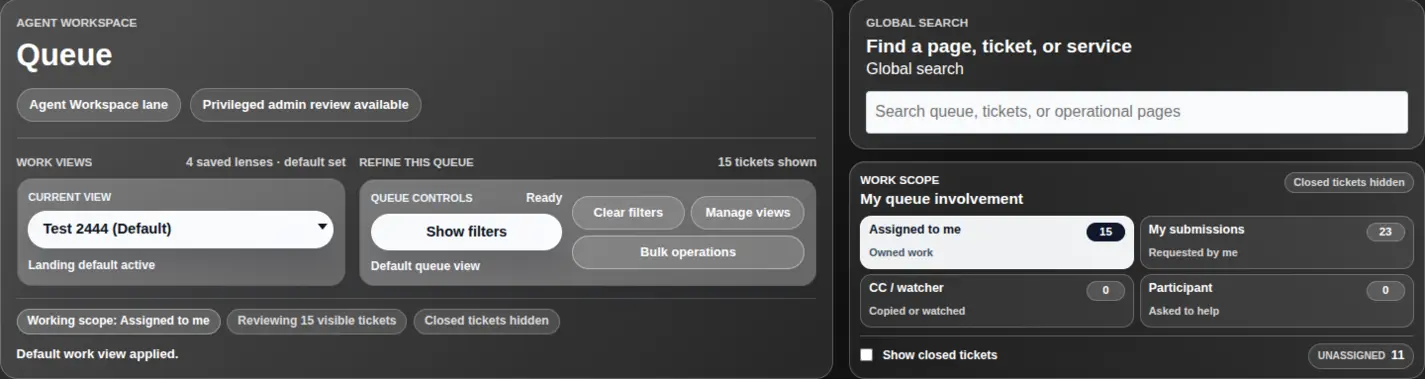
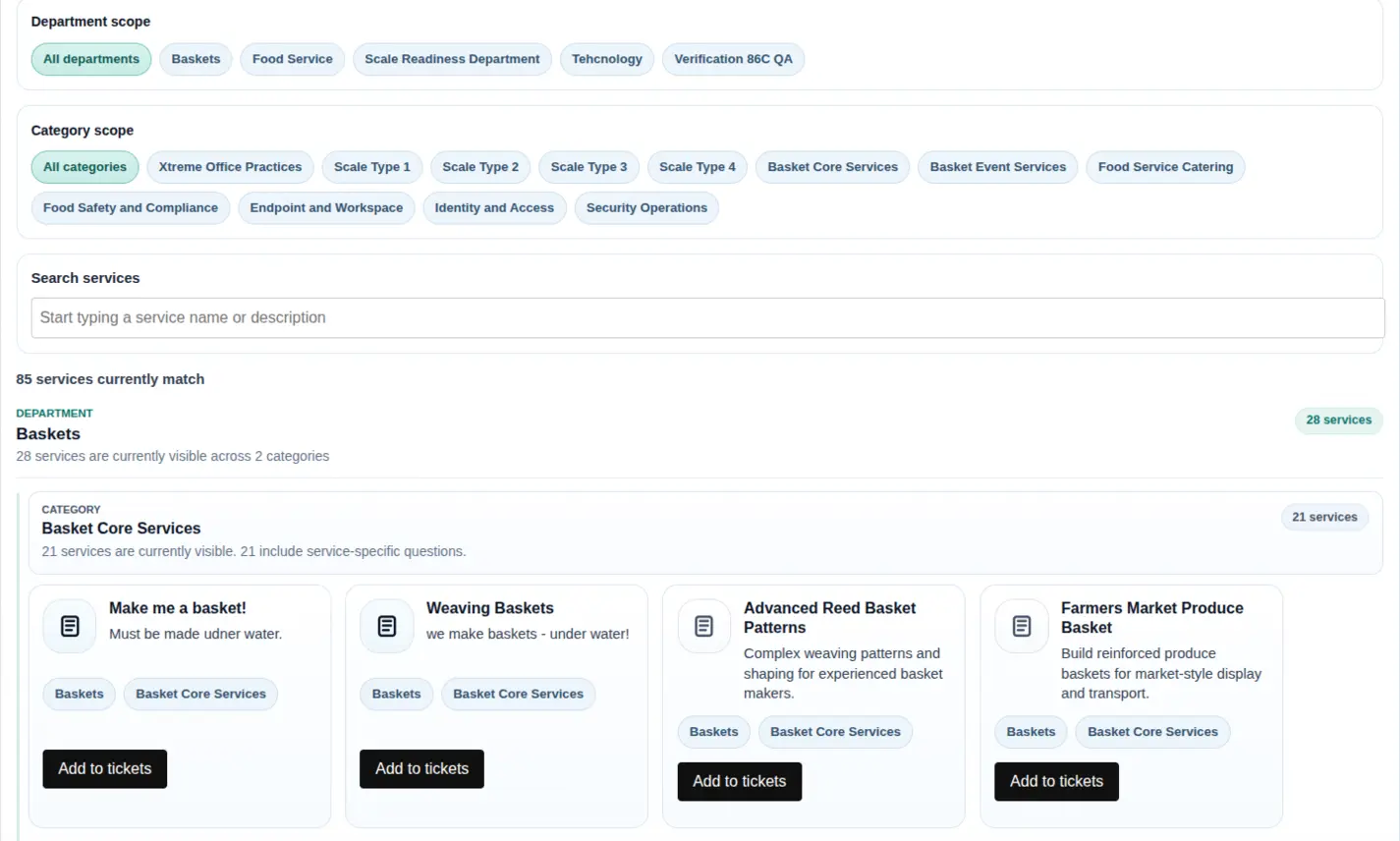
Queue signals, access posture, workflow context, and audit-minded operations.
Evaluate it yourself
The published manual, the built-in demo dataset, and the no-card trial are designed so a team can evaluate BareBones end to end without a sales motion. The manual's worked example takes an empty installation to a working, auto-assigning service desk — and it has been walked live, every step. Questions along the way go to the BareBones community, which anyone can read; customers on an active license get a Verified Customer badge and a customers-only room there.
A running service desk with a worked scenario already in it - queue, SLA pressure, approvals, an outside participant, and role boundaries you can see from both sides. No install, no form, resets nightly.
Try it nowThe full product manual is published openly: install, configure, use, operate, reference, and a worked example that takes an empty installation to a first working service.
Open the manualA System Administrator can seed a bounded evaluation dataset - a fictional company with departments, tickets, projects, approvals, and a guided review walkthrough - then purge it completely when the evaluation is done.
How demo data worksA 60-day trial key carries enough worker seats to seed the demo dataset and walk the first-working-service example end to end. No card required.
Request a trial keyCapability map
BareBones Ticketing is for organizations that need ticketing control, audit posture, workflow ownership, bounded collaboration, and deployment choice. It is strongest when a team cares about how the service desk behaves as a controlled system, not only whether it can collect and close tickets.
Product surfaces
BareBones Ticketing covers the daily surfaces around requests, catalog intake, queues, project context, bounded external participation, and privileged administration.
Scoped ticket home base for request status, search, department focus, shared updates, and the next useful action.
Department and category scoped intake with service-specific request paths and guided add-to-ticket actions.
Saved work views, scoped queue ownership, lane signals, bulk controls, workflow actions, and audit visibility.
Project records connect tickets, departments, workflow state, role staffing, linked work, and operational context.
Bounded external access keeps invited participants inside intentionally shared ticket context, updates, and files.
Privileged tenant, identity, workflow, SLA, catalog, audit, diagnostics, and operational controls behind admin boundaries.
Product surface
Request lifecycle
The product value is the path through the system: intake, authority, workflow, operating signals, evidence capture, and reviewable history stay connected.
Requesters choose a visible department or service path, answer the service-specific fields that matter, and receive a readable ticket reference.
Requester, agent, project, admin, and external lanes are separate. Visibility comes from mappings the product enforces, not a broad shared workspace.
Service workflow comes first when configured, department workflow keeps routine work moving, and product fallback prevents undefined behavior.
Agents work through saved views, lane signals, owner state, status, filters, SLA warning or breach signals, and scoped candidate sets.
Transition prompts, approval gates, related action-item checks, and constrained workflow actions collect context without turning prompts into authority.
Ticket history, audit events, redaction posture, external-safe exchange, and import provenance remain bounded to the surfaces allowed to review them.
Governed control
Broad authority, bulk change, outside follow-up, and evidence review are where service work can become hard to explain later. BareBones keeps those control points visible without making every action heavy.
Ordinary teams can use clean service desk flows without making every action heavy. Teams with stricter controls can enable stronger approval, disclosure, external-access, and evidence posture where the work needs it.
LDAP, Active Directory, SAML, and local users can identify people, but product authority still comes through BareBones groups, department access, project roles, SystemAdmin grants, step-up checks, and audited admin changes.
Invite a vendor, customer, auditor, or partner into the specific ticket context you intentionally share. They do not receive queue, requester, agent, admin, or arbitrary discovery access.
Sensitive transitions can require selected approvers, regulated approval posture, or completion of related child action items before the move becomes available.
Operators narrow the queue first, preview the intended change, step up when required, and re-check authority at apply time. Hidden, stale, or no-longer-eligible records fail closed instead of riding along.
Audit review and export, ticket chronology, redaction register, controlled reveal approvals, import preflight, dry run, apply ledger, provenance, and reconciliation are product surfaces rather than hidden scripts.
Launch paths
Trial and Free Edition keys do not require a card. Paid keys appear in your account after payment is verified.
Trial and Free Edition deliver BareBones Ticketing 1.1.0, the current release. Your account shows the exact version with every download.
Before purchase: review commercial terms, procurement basics, the buyer proof path, the self-hosted service desk guide, or worker pricing examples.
A time-limited key for evaluating fit before purchase.
A low-friction license for very small self-hosted use with no support commitments.
Annual paid licensing for governed teams that need self-hosted service desk control.
Founding customer path
Limited first-customer licensing for governed teams that want permanent self-hosted BareBones entitlement.
A fixed number of perpetual licenses for the teams that adopt first, offered while 1.0 launches. When the initial-release count is gone, this path closes.
10 of 10 initial-release opportunities remain
Pricing examples
Professional annual list price is USD 150 per worker/year. These examples are before applicable taxes, approved discounts, credits, refunds, implementation services, or separately approved written terms.
USD 1,500/year
10 x USD 150 per worker/year
The public checkout minimum is 3 Workers. The paid pool can stay on one deployment key or be allocated across more than one Professional key after purchase.
USD 3,750/year
25 x USD 150 per worker/year
A 25-worker purchase keeps one annual renewal date and one paid worker pool. Later worker additions increase that same subscription after paid-invoice confirmation.
USD 15,000/year
100 x USD 150 per worker/year
For larger governed deployments, ask before purchase if procurement, rollout planning, implementation scope, or internal approval needs a written answer first.
A paid Professional subscription is one worker pool: the account dashboard can divide it across multiple deployment keys while keeping one renewal date. Lifetime License is a separate USD 20,000 one-time path with no annual renewal, unlimited workers, and 4 active internal deployment activations under the approved Lifetime terms; it does not use the worker-pool allocator and does not include implementation services by default.
Buyer FAQ
Use these answers to choose a trial, Free Edition, Professional license, Lifetime path, or fit conversation.
Yes. The live demo at demo.finlay.works is a running instance of the shipping build with a worked scenario in it, and the sign-in details are published on the demo page. It resets nightly, so explore it freely.
BareBones Ticketing launches as self-hosted downloadable licensing for teams that want to operate the service desk in their own environment.
After payment is verified. Your account page may show that Checkout returned successfully first; the paid key appears after Finlay.works receives the verified payment confirmation.
BareBones Ticketing Lifetime License is a limited one-time purchase path for early customers. It provides perpetual Professional entitlement, unlimited workers, 4 active internal deployment activations, future BareBones product features, standard product support under the approved Lifetime terms, and no annual renewal. The key is issued only after verified purchase fulfillment.
Trial keys run for 60 days without a card. Free Edition is a yearly renewable 2-worker key for very small self-hosted use. It is self-support only and does not include SLA, support, migration help, guarantees, or a validation package.
For each release, the validation team designates a validation package: the executed validation record for that exact release, written for QA and compliance readers. Professional and Lifetime customers download it from their account, with its SHA-256 shown beside the download. Validation designated during a paid Professional term remains available after the term ends; validation designated later requires an active license. Trial and Free Edition do not include it.
No. Customers sign in with an email link, then use the account dashboard to view license keys, download a license manifest, and manage activations.
The key carries the worker limit, term, and activation state. BareBones uses the Finlay.works licensing service to verify whether the key is active before licensed use continues.
Yes. A paid Professional subscription represents a worker pool. The account dashboard can divide that pool across multiple Professional license keys, such as separate production, lab, or site deployments, while keeping one subscription and one renewal date.
Not always. BareBones is a focused self-hosted service desk, not an everything-suite. Broad ITSM platforms may fit better when CMDB or asset discovery, omnichannel contact center, mobile-first field service, marketplace apps, or AI-heavy operations are the buying priority.
Migration should be scoped before purchase. BareBones supports a controlled file/package import workbench pattern with preflight, dry-run, apply ledger, reconciliation, and provenance; it is not sold as live sync, universal migration, or arbitrary workflow import.
Ask first if the decision depends on finished regulated-release proof, validation package scope, security certification, high-availability architecture, customer scale evidence, or migration service expectations.
Fit assessment
You do not need a finished requirements document. A few paragraphs, one example, or a rough workflow problem is enough for Finlay.works to sort fit, gaps, release posture, and next steps.
Get expert fit help